LaunchWeather
- 3.6
- Rating
- 100.00K
- Installs
- Free
- Price

 Analysis by App-foxy
Weather apps are easy to underestimate. I usually open one for a few seconds, check whether I need a jacket or an umbrella, and move on with my day. LaunchWeather is built around that quick habit: it is a free weather app from Lumora Studio that aims to make current conditions easy to reach, especially from the home screen. After spending time with it, I see the appeal clearly, but I also think its usefulness depends heavily on how reliably your phone can reach fresh weather information when you need it.
This is not the kind of app I would choose simply because I want the longest forecast or the most specialist meteorological detail. Its strongest idea is convenience. If your daily weather check is a short glance before leaving home, the compact approach makes sense. If you need deep storm analysis, extensive historical charts, or a weather service you can trust in places with weak reception, you should judge it more cautiously.
How LaunchWeather fits into an everyday weather routine
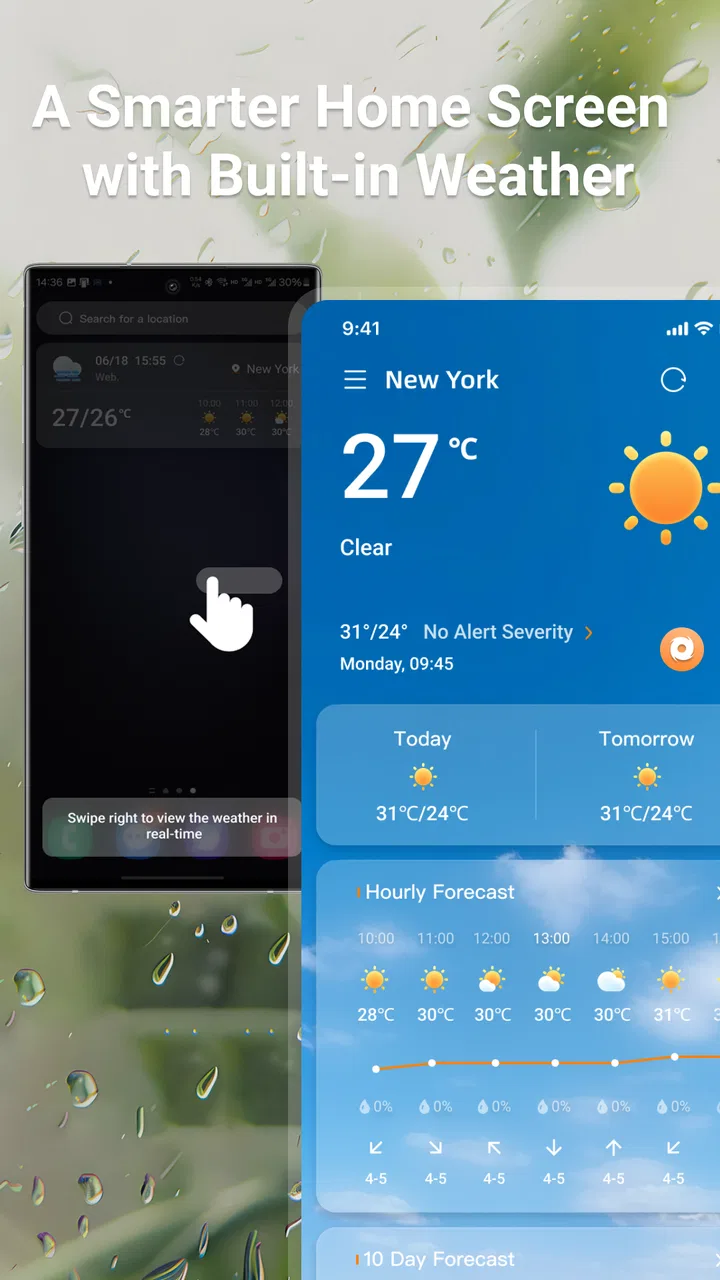
The first thing that stands out is the app’s intended rhythm. Rather than turning weather into a research task, it is designed for quick checks throughout the day. That makes it a natural fit for deciding whether to walk, cycle, commute, take a child to school, or change plans before heading outside. The home-screen focus is particularly useful because it reduces the number of steps between noticing the weather and acting on it.
You May Also Like

 Blood Strike: 2.5 Anniversary
Blood Strike’s Loadouts Turn Every Drop Into a Tactical Gamble
A close look at Blood Strike’s custom loadouts: how fast access to signature weapons reshapes its battle royale rhythm, rewards preparation, and narrows the gap between fights.

 Pandora - Music & Podcasts
Pandora’s Music Is Easy to Start, but Harder to Recover
Pandora’s strength is its low-effort path from a seed to a station. Its weak spot is how much confidence it asks you to place in connection, setup, and quiet recovery.

 8 Ball Pool
 Is Built on Rivalries, Rematches, and Routine
A close look at the rivalries, rematches, shared routines, and unanswered safety questions that turn a quick pool match into a persistent mobile community.

 Samsung Music
’s Quiet Strength Is Playing What You Already Own
Its reach comes less from spectacle than from dependable access to a personal library. That simplicity is both the app’s strongest retention engine and its ceiling.

 AccuWeather: Weather Radar
AccuWeather Review: A Quick, Clear Forecast for Everyday Decisions
For everyday plans, the best forecast is the one you can understand quickly. AccuWeather makes rain timing, radar, and local conditions easy to act on, with a few trade-offs.

 Hill Climb Racing
Why Hill Climb Racing Still Turns Crashes Into One More Run
A tiny car, a bumpy hill and one more upgrade: Hill Climb Racing keeps resurfacing because its simple chaos makes every near-miss feel personal.
More From Our News Desk
View All News


I like this approach for ordinary decisions. A weather app does not always need to become a dashboard full of maps and graphs. Sometimes I only want to know whether conditions have changed since breakfast. A glance at the home screen can be less distracting than opening a feature-heavy alternative, waiting through several panels, and searching for the one detail that matters.
That simplicity also creates a trade-off. A home-screen glance is valuable only when the information is recent enough to guide a decision. Weather changes, and an old display can create more confidence than it deserves. I would treat the app as a convenient first look, then open it for a closer check when the decision has real consequences, such as a long drive, outdoor work, or a journey involving several locations.
The app is available at no cost, which makes experimentation easy. You can try it without committing money or rebuilding your whole phone setup around it. Its age rating is Everyone, so the straightforward presentation should suit a broad audience, including people who want a simple weather tool rather than a technical one.
Connectivity is part of the experience
Because LaunchWeather presents current weather information, network access naturally becomes an important part of using it. When I am at home on a stable connection, the quick-check concept feels most convincing. I can look at the home screen, open the app when I want more context, and make a routine decision without much friction.
The experience is different when I am moving between networks. A train platform, underground passage, crowded event, rural road, or building with poor reception can turn a fast weather check into a question about freshness. The key issue is not merely whether the app opens. What matters is whether the information available at that moment reflects current conditions rather than a previous update. I would avoid assuming that a visible weather display is automatically live.
This is where LaunchWeather differs from a weather app that is built around downloaded forecasts, radar layers, or more explicit update controls. Those alternatives may communicate freshness more clearly or provide more ways to cross-check a situation. LaunchWeather’s appeal is speed and accessibility, but that convenience means I would pay closer attention to when the information was last refreshed, especially before leaving a reliable connection.
A practical habit helps: check the app while you still have dependable connectivity, not only after you have already reached the location where the weather matters. For a morning commute, that means looking before leaving home. For a day trip, I would check before entering a low-signal area and again when a stable connection returns. This is not a promise of offline operation; it is simply a sensible way to reduce uncertainty around any connected weather service.
Useful on the move, with sensible expectations
LaunchWeather makes the most sense for people who check weather in short bursts. I can imagine using it while standing by the door, waiting for a rideshare, walking to a bus stop, or deciding whether to carry an extra layer. The home-screen emphasis suits these moments because I do not necessarily want to stop and explore a full forecast interface.
It is also a good match for users who find large weather apps visually tiring. Many alternatives compete for attention with animated maps, alerts, advertising panels, hourly rows, and multiple forecast categories. Those features can be valuable, but they can also slow down a simple decision. LaunchWeather’s narrower purpose may feel calmer for someone who wants a glance rather than a weather hobby.
There is a less obvious mobile trade-off, though. A widget or quick-access display can become part of your visual routine, which means you may stop questioning it after a while. I recommend occasionally opening the full app instead of relying exclusively on the home screen. That extra step gives you a better chance to notice whether the information has refreshed and whether the weather has become more changeable than it looked earlier.
For travel, I would use it as one layer of preparation rather than the only source of information. Before a short city visit, it may be perfectly adequate for deciding what to wear. Before hiking, boating, driving through changing terrain, or working outside for hours, I would prefer an alternative that offers more detailed local context and clearer severe-weather tools. The right choice depends less on the app’s category than on the cost of being wrong.
What happens when the connection is unreliable?
Connectivity problems are where a quick weather app needs the most realistic handling. If the network is slow, I would first give the app a moment rather than repeatedly tapping refresh. Repeated attempts rarely improve a weak signal and can make the experience feel more frustrating than it needs to be. If the information does not appear to update, I would treat the display as unconfirmed for a current decision.
When service returns, reopening the app is a sensible recovery step. I would also check the home screen again after the phone has re-established its connection, because a glance made during a dead zone should not automatically be treated as equivalent to a newly refreshed check. This simple two-stage routine—check before the weak-signal area, then check again after reconnecting—fits the app’s quick-access design without pretending that connectivity problems do not exist.
Another useful habit is to separate low-stakes and high-stakes decisions. If I am deciding whether to take a light jacket for a nearby errand, an interrupted update is an inconvenience. If I am planning a long outdoor activity, the same uncertainty is a reason to postpone the decision until I can verify conditions through a more detailed source. LaunchWeather can remain useful in both cases, but it should not carry the same responsibility in both.
I would also avoid basing an important plan on a single glance from any weather app. Weather is not static, and a phone can be disconnected, delayed, or simply showing information that no longer matches the exact place I am heading toward. The app’s convenience is strongest when paired with good judgment, not when it replaces it.
Using it without wasting mobile data
For most people, occasional weather checks are unlikely to be a major data concern, but habits still matter. The efficient way to use LaunchWeather is to check it deliberately rather than opening it every few minutes out of curiosity. If the home-screen view already answers the question, there is little reason to keep reopening the app.
On a limited mobile plan, I would make the home screen the first stop and reserve full app openings for moments when I genuinely need a closer look. Checking while connected to a trusted home or workplace network can also reduce reliance on mobile data, particularly if you are preparing for a day away from stable reception. This is a usage recommendation, not a claim about a specific data-saving mode.
There is a useful balance between saving data and demanding freshness. Checking too rarely can leave you relying on an old view; checking constantly can become wasteful and distracting. I would check once before leaving, once before a major change of location, and again when conditions seem noticeably different. That pattern is more practical than refreshing continuously.
Battery use follows a similar principle. A weather app that lives on the home screen is convenient, but convenience can encourage passive checking. I would keep the display where it is easy to see, then avoid opening the app repeatedly unless the weather is changing or the day’s plans require it. The goal is to make the app reduce effort, not create another notification habit.
Where it beats familiar alternatives—and where it does not
Compared with a phone’s built-in weather panel, LaunchWeather’s main advantage is that it gives the weather experience its own dedicated place. That can be appealing if the default tool feels buried, cluttered, or inconvenient to reach. The home-screen orientation also makes it suitable for someone who wants weather to be visible as part of the normal phone layout.
Compared with large third-party weather services, its advantage is focus. I would choose it when I want a fast routine check and do not need to explore radar, detailed forecasts, or specialist information. The disadvantage is equally clear: users who depend on extensive context may find a quick-access design too limited for serious planning. A more established, information-dense alternative is likely better when you need several forecast views in one place.
LaunchWeather also sits differently from a general search engine. Searching the weather can be useful when you want a one-time answer for an unfamiliar location, while a dedicated app is more convenient for repeated checks. The app becomes most worthwhile when weather is part of your daily routine rather than an occasional question.
Its public reception suggests a mixed but meaningful level of interest: it has an average rating of 3.7 from roughly 570 ratings, and it has passed 100 thousand installs. I read that as a reason to approach it with balanced expectations. There is enough adoption to make it worth trying, but the rating does not suggest that every user will find the experience flawless. The developer, Lumora Studio, has released version 1.1.9, and the app supports phones running Android 6.0 or later.
Who should install it?
I would recommend LaunchWeather to someone who wants a free, uncomplicated way to keep weather close at hand. It is particularly suitable for routine decisions: choosing clothes, deciding when to leave, checking whether a short walk is sensible, or noticing a change before starting an errand. People who dislike overly busy weather interfaces may appreciate its narrow purpose.
It is also a reasonable choice for a secondary weather tool. You can use it for quick daily awareness while turning to a more detailed source when conditions become important. That combination respects what LaunchWeather does well without asking it to serve every possible weather need.
I would skip it if you want extensive forecasting tools, detailed weather maps, or a strong focus on difficult outdoor environments. I would also hesitate if you regularly spend time in places with unreliable connectivity and need dependable access to carefully prepared information. In those situations, the convenience of a home-screen glance may not compensate for the uncertainty around updates.
Before settling on it, I would ask myself one simple question: do I usually need a fast answer, or do I need a complete weather briefing? If the answer is fast, LaunchWeather has a clear reason to exist. If the answer is complete, another category of weather app will probably fit better.
My final take on the connected weather experience
LaunchWeather succeeds when I use it as a lightweight part of my daily phone routine. Its free access, broad age rating, and home-screen approach make it easy to try, and its purpose is immediately understandable without turning weather into a complicated task. The app is most comfortable in ordinary connected situations where I want a quick indication before making a small decision.
Its limitation is not necessarily a flaw; it is the consequence of choosing convenience over depth. A quick display cannot replace detailed forecasting in every situation, and a connected weather experience deserves extra care when the network is weak. I would check it before entering a low-signal area, avoid treating an unchanged display as proof of current conditions, and use a more detailed alternative when the consequences of a wrong decision are serious.
My recommendation is simple: use LaunchWeather for fast everyday awareness, but keep your expectations tied to the connection and the importance of the decision. For a jacket, a short walk, or a quick morning check, it can be a pleasant fit. For demanding travel or outdoor planning, I would pair it with a stronger source rather than rely on it alone.
FAQs for LaunchWeather
01What features does LaunchWeather offer compared to other weather apps?
LaunchWeather provides real-time weather updates, hourly forecasts, and detailed 7-day predictions. It includes interactive radar maps and severe weather alerts. Unlike many other apps, it offers a personalized dashboard and integrates with smart home devices for automated weather updates, making it particularly versatile for tech-savvy users.
02Is LaunchWeather available on both Android and iOS?
Yes, LaunchWeather is available for download on both Android and iOS platforms. Users can easily find it on Google Play Store for Android devices and the Apple App Store for iOS devices. The app is optimized for a wide range of devices, ensuring a smooth experience across different operating systems.
03Does LaunchWeather require a subscription for full access?
LaunchWeather offers both a free version and a premium subscription. While the free version includes basic features such as daily forecasts and weather alerts, the premium subscription unlocks advanced features like ad-free browsing, detailed radar maps, and extended forecasts. The subscription is offered on a monthly or yearly basis.
04How accurate is the weather data provided by LaunchWeather?
LaunchWeather sources its data from multiple reliable meteorological organizations, ensuring high accuracy. It uses sophisticated algorithms to process this data and provide precise local forecasts. Users have reported satisfaction with its accuracy, especially for short-term forecasts and severe weather alerts, which are critical for planning.
05Can LaunchWeather be integrated with other apps or devices?
Yes, LaunchWeather offers integration capabilities with various smart home devices and apps. It can sync with virtual assistants like Alexa and Google Assistant for voice-activated updates. Additionally, it supports IFTTT (If This Then That) for creating custom weather-triggered actions, enhancing its functionality for tech enthusiasts.
Pros
- Accurate real-time weather updates.
- User-friendly interface with intuitive navigation.
- Customizable alerts for severe weather.
- Detailed forecasts up to 10 days ahead.
- Minimal battery consumption.
Cons
- Contains in-app advertisements.
- Limited features in the free version.
- Requires internet for full functionality.
- Occasional delays in radar updates.
- No offline mode for data access.

LaunchWeather
Gallery